AI Agents for Business

AI Agents That Help Your Business Serve Customers 24/7

Create AI agents that answer customer questions, share accurate business information and help customers request appointments through your website and WhatsApp.

  • Website Agent — answer visitor questions using your configured knowledge.
  • WhatsApp Booking Agent — handle appointment requests and bookings.
  • Manage conversations, leads and agent performance in one place.
Website Agent
Your Website
Hazana AgentHow can I help today?
Business chat
Can I request an appointment?
I can help with that. Which service?
Message
Website AgentBooking AgentIllustration of supported channels

WEBSITE AGENT

Your Website, Powered by an AI Agent

Answer visitor questions with configured website knowledge, files and Q&A. Set how the agent greets people, responds and hands off when it needs help.

  • Website pages, files and Q&A knowledge
  • Welcome message, instructions and quick replies
  • Lead capture and fallback contact details
  • Domain settings, test chat and publishing
Create Website Agent
ILLUSTRATIVE CHAT EXAMPLE
H
Website AgentExample customer conversation

Hi, can you tell me about your services?

I can help with information in the business knowledge provided to me.

Could someone contact me?

You can use the contact option configured for this agent.

Ask a question…
This is a conceptual illustration, not a live agent response.

WHATSAPP BOOKING AGENT

Make Appointment Booking Easier with WhatsApp

Set up a booking agent with your business type, services and available hours, then configure the supported WhatsApp and website channels.

  • Handle appointment requests
  • Use configured services and availability
  • Confirm bookings based on saved settings
  • Set up supported WhatsApp and website channels
Create Booking Agent
ILLUSTRATIVE BOOKING CONVERSATION
Booking AgentWhatsApp channel example

I’d like to request an appointment.

Which service would you like? I can share the available options.

Please show me the available times.

Message…
Availability and booking responses use the business setup.
From visitor conversations to agent management

Customer Experience and Admin Experience

Help visitors get answers while keeping configuration and conversation tools in your account.

Customer Experience

A website chat widget or configured booking conversation.

yourwebsite.com · chat widget example
H
Hazana AIExample widget
Hello! How can I help?
What services do you offer?
I can answer from the information configured for this agent.
Type your message…

Conceptual preview; customer replies depend on your configured knowledge.

Admin Experience

Manage and review your agents in the existing account workspace.

EXISTING MANAGEMENT AREAS
SettingsWelcome message, instructions, lead capture and fallback contact.
KnowledgeWebsite sources, files and Q&A used by the agent.
Domains & PublishManage allowed domains and publish the website widget.
Analytics & InsightsReview available agent performance and conversation insights.
Unanswered QuestionsReview questions the agent could not answer and add guidance.
Leads & HistoryReview captured leads and past conversations where available.

Feature overview based on the existing agent management interface, not a dashboard screenshot.

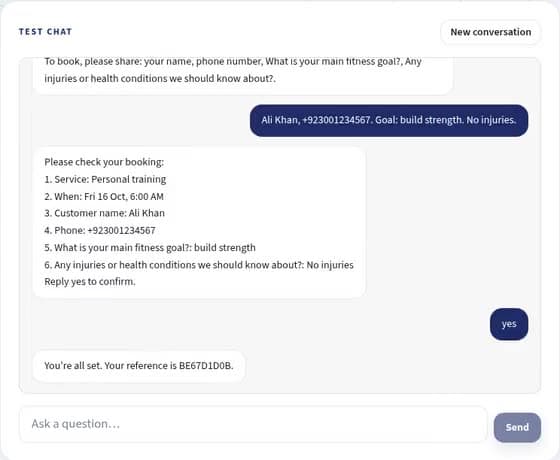
Hazana AI booking agent test chat showing a sample appointment confirmation in the existing interface.
Existing product interface

Test the agent before it goes live

The current agent workspace includes a test chat so you can try questions and review how your configured agent responds before publishing.

Explore My AgentsExample test-chat screenshot from the repository. The displayed conversation is sample content.
Simple process

Create and Launch Your AI Agent in Three Steps

Configure, test and publish using the existing setup flow.

  1. 1

    Create Your Agent

    Choose a supported website or booking agent and configure its initial details.

  2. 2

    Add Knowledge

    Add website information or set up business details, services and availability for bookings.

  3. 3

    Launch and Share

    Test the experience, publish the website agent or finish setting up its supported booking channels.

Works for many businesses

Helpful Support for Service-Based Businesses

Examples of ways businesses may configure their website or booking agent.

✚

Clinics & Healthcare

Answer general service questions and handle appointment requests.

Not for medical advice.
✿

Salons & Spas

Share configured services and help customers request a booking.

⌂

Home Services

Answer common service questions and collect inquiry details.

▱

Consultants

Answer common questions and help visitors find contact options.

▤

Local Businesses

Share configured business information and manage customer requests.

Common questions

AI Agents FAQs

What are AI Agents in Hazana AI?

Hazana provides website agents that answer visitor questions using configured knowledge and booking agents that help handle appointment requests on supported website and WhatsApp channels.

How does the Website Agent work?

You add website pages, files or Q&A knowledge, configure the agent and test its answers. When ready, configure a domain and publish the website chat widget.

Does the Website Agent use my website content?

You can add website pages for the agent to use as knowledge. The content available to it depends on the sources you configure and successfully add.

Can I customize the welcome message and instructions?

Yes. Website-agent settings include a welcome message, custom instructions and quick replies. Fallback contact details and lead capture can also be configured.

Can I see customer conversations and leads?

The website-agent workspace includes Leads and History tabs, along with Analytics, Insights and Unanswered Questions where available.

How does the WhatsApp Booking Agent work?

Create a booking agent, configure its business type, services and availability, then use the supported WhatsApp channel setup. Booking requests and confirmations depend on the saved booking settings.

Can I manage multiple agents?

The My Agents area lists agents in your organization. Your plan controls the number you can create; see the current agent billing and pricing details for your account.

Do I need a paid plan?

Agent access, credits and booking allowances follow the existing plan and trial rules. The current plans page shows the available tiers; this landing page does not change those limits.

Website and booking agents

Create Your First AI Agent Today

Answer questions, capture leads and manage booking requests with Hazana AI.

Create AI Agent
AI Agents for Business – Website & WhatsApp Agents | Hazana AI